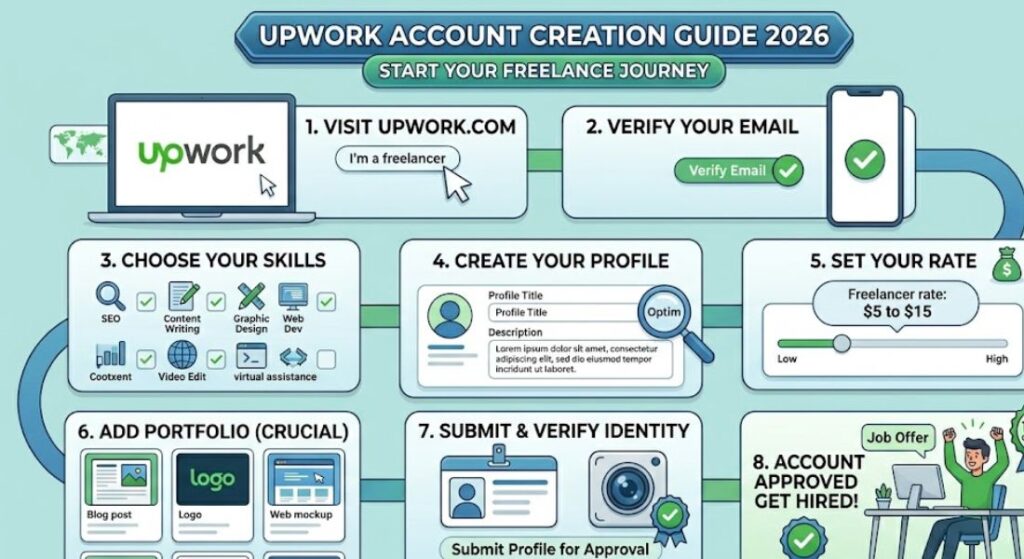
Upwork is one of the most popular freelancing platforms in the world, where millions of freelancers earn money by offering services like SEO, content writing, graphic design, web development, and virtual assistance. If you are a beginner in freelancing, Upwork is a great place to start your journey.
However, many beginners get confused when creating their account and setting up their profile. A strong and properly optimized Upwork account increases your chances of getting approved and winning clients.
What is Upwork?
Upwork is an online freelancing marketplace where clients post jobs and freelancers send proposals to get hired. It works as a bridge between clients and freelancers.
On Upwork, you can:
- Find freelance jobs
- Work with international clients
- Build a professional portfolio
- Receive secure payments
- Work remotely from anywhere
Upwork is trusted by businesses worldwide, making it one of the best platforms for beginners and professionals.
Requirements Before Creating an Upwork Account
Before signing up, make sure you have:
- A valid email address
- A professional username idea
- A clear profile picture
- Basic knowledge of your freelancing skill
- A simple portfolio (optional but helpful)
Having these ready makes the process smoother and increases approval chances.
Step-by-Step Guide to Create an Upwork Account
Step 1: Visit Upwork Website
Go to the official Upwork website and click on “Sign Up”.
You will see two options:
- I’m a freelancer
- I’m a client
Select “I’m a freelancer” because you want to earn money by offering services.
Step 2: Sign Up Using Email
Enter your:
- Email address
- Password
Or you can sign up using Google or Apple accounts.
After that, Upwork will send a verification email. Open your email and verify your account.
Step 3: Enter Personal Information
Upwork will ask for basic details like:
- Name
- Country
- Time zone
Make sure to enter correct information because it cannot be changed easily later.
Step 4: Create Your Username
Your username is very important because it represents your professional identity.
Tips for Username:
- Keep it simple
- Avoid numbers and symbols
- Make it professional
Example:
- Good: SEOExpertAli
- Bad: user12345xyz
Step 5: Choose Your Skills
Now select your skills based on what services you want to offer.
Popular Skills:
- SEO
- Content Writing
- Graphic Design
- Web Development
- Digital Marketing
Choose only relevant skills. Do not select too many at once.
Step 6: Write Your Profile Title
Your profile title is the first thing clients see.
Example:
SEO Specialist | Keyword Research & On-Page SEO Expert
A strong title increases your chances of getting hired.
Step 7: Write Your Profile Overview
This is your introduction section.
A good overview should include:
- Who you are
- What services you offer
- Your skills
- How you help clients
Example:
I am a beginner SEO specialist with strong knowledge of keyword research and on-page SEO. I help websites improve their rankings and increase organic traffic using proven strategies.
Keep it simple and clear.
Step 8: Add Your Skills and Experience
Even if you are a beginner, you can still add:
- Skills you learned
- Online courses
- Practice projects
If you have no experience, focus on your skills and learning ability.
Step 9: Add Portfolio (Very Important)
A portfolio shows your work samples.
You can include:
- Blog articles
- SEO samples
- Logo designs
- Website demos
If you have no real clients, create sample work yourself.
Step 10: Set Your Hourly Rate
Upwork allows you to set your own rate.
Beginner Tips:
Start with a low rate like:
- $5 to $15 per hour
Later, increase your rate as you gain experience and reviews.
Step 11: Add Education and Certifications
Add:
- School/college details
- Online courses
- Certificates (if any)
This increases your profile trust level.
Step 12: Verify Your Identity
Upwork may ask for:
- ID card
- Selfie verification
This step ensures account security and authenticity.
How to Get Approved on Upwork Faster
Complete Profile 100%
A full profile gets more visibility.
Use Professional Photo
A clear and professional image builds trust.
Write a Strong Overview
Explain your skills clearly and simply.
Add Portfolio Samples
Even 2–3 samples are enough for beginners.
Stay Active
Regular activity improves your chances of getting jobs.
How to Start Getting Jobs on Upwork
After creating your account, follow these steps:
Step 1: Search for Jobs
Look for jobs related to your skill.
Step 2: Send Proposals
Apply to jobs with personalized messages.
Step 3: Communicate with Clients
Explain how you can help them.
Step 4: Complete the Work
Deliver high-quality work on time.
Step 5: Get Reviews
Positive reviews help you get more clients.
Tips for Beginners on Upwork
Start Small
Apply for small projects first.
Be Consistent
Apply daily to jobs.
Improve Skills
Keep learning and improving.
Write Better Proposals
Personalized proposals win more clients.
Be Patient
Success takes time.
Future of Upwork in 2026
Upwork continues to grow as more businesses hire remote freelancers. The demand for skills like SEO, AI content creation, and digital marketing is increasing rapidly.
Freelancers who stay consistent and improve their skills can build long-term income on Upwork.
Conclusion
Creating an Upwork account in 2026 is simple, but success depends on how well you set up your profile and present your skills. A strong profile, good portfolio, and consistent effort can help you get your first freelance job faster.
Upwork is a powerful platform for beginners, and with the right strategy, you can build a successful freelancing career and earn money online from anywhere in the world.
FAQs
1. Is Upwork free to join?
Yes, creating an Upwork account is completely free.
2. Can beginners get jobs on Upwork?
Yes, beginners can get jobs by creating a strong profile and sending good proposals.
3. Do I need experience to start on Upwork?
No, you can start with sample work and basic skills.
4. How long does approval take on Upwork?
Usually, it takes a few minutes to a few hours after profile submission.
5. What is the best skill for Upwork beginners?
SEO, writing, and virtual assistance are great beginner skills.
6. How do I get my first client on Upwork?
Apply daily, write strong proposals, and start with small projects.
7. Does Upwork charge fees?
Yes, Upwork takes a small percentage from your earnings.
8. Can I work on Upwork part-time?
Yes, you can work part-time or full-time depending on your availability.
9. Is Upwork safe for freelancers?
Yes, Upwork provides secure payment protection.
10. How much can beginners earn on Upwork?
Beginners can earn from $50 to $500 per month depending on skills and effort.